Detecting Password Spraying in Wazuh
Wazuh catches brute force on one account, but not one password tried against every account in the domain. So I wrote a rule for it, sprayed a test domain to check it, and then looked at what it still misses.
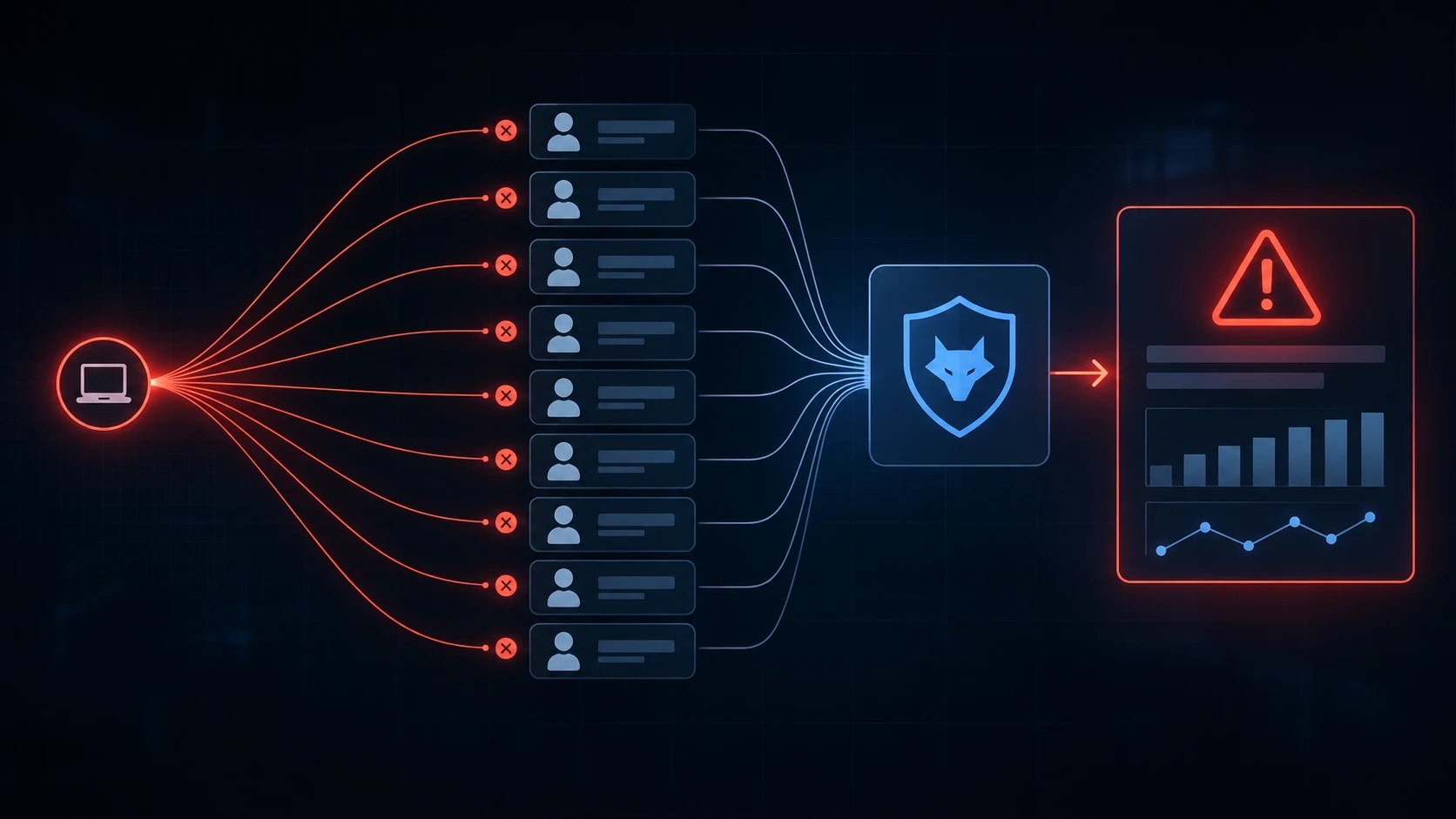
Out of the box, Wazuh tells you when someone hammers one account from one IP. That’s brute force, and it’s already covered.
It doesn’t tell you when someone takes one password, say Spring2026!, and tries it once against every user in the domain. Every account gets one failed logon, nobody gets locked out, and if you look at any single account, nothing really happened.
That’s password spraying (T1110.003). If I landed on a network with a list of usernames it’s one of the first things I’d try, so I wanted a rule for it.
What I was looking for
Brute force is one user and a lot of tries. A spray is the opposite: one source trying a lot of different users, once or twice each.
So in Wazuh terms I need the same source IP, a different username each time, and enough of them in a short window. same_field and different_field do exactly that.
Before I wrote anything I opened a real 4625 (failed logon) from a test DC and checked two fields:
win.eventdata.ipAddresshad a real address, not-win.eventdata.targetUserNamewas filled in
If ipAddress is - in your events, same_field puts everything in one bucket and the rule stops making sense, so check that first.
The built-in rule for 4625 with “unknown user or bad password” was 60122 in my environment, so my rule sits on top of it. Open 60122 in your ruleset and check it covers both kinds of spray failures: wrong password on a real account (substatus 0xC000006A) and a name that doesn’t exist (0xC0000064). Locked and disabled accounts usually go to other rules and won’t be counted.
One thing that’s easy to miss is where the 4625 gets logged: on the machine the attacker is logging on to. Spray the DC and the DC logs it with the source IP. Spray a file server or OWA and the 4625 stays on that server, while the DC only gets a 4776 with a workstation name and no IP. Without an agent on that server, the rule sees nothing.
How I’d close that gap:
- Put agents on the servers people actually authenticate to: file servers, RDP and jump hosts, Exchange/OWA, NPS for the VPN. Not every workstation. If volume worries you, an XPath query on the agent can limit the Security channel to the events you need, like 4624 and 4625.
- Turn on NTLM auditing on the DCs (Network security: Restrict NTLM: Audit NTLM authentication in this domain). Event 8004 in
Microsoft-Windows-NTLM/Operationalshows the user, the workstation and the server that passed the logon through, so you see which server got hit even without an agent on it. - Block SMB and RDP between workstations with the host firewall. Then a spray can only go to servers you already watch.
The rule
First version, the one I tested:
<group name="windows,authentication,attack,">
  <rule id="100400" level="12" frequency="8" timeframe="60">    <if_matched_sid>60122</if_matched_sid>    <same_field>win.eventdata.ipAddress</same_field>    <different_field>win.eventdata.targetUserName</different_field>    <description>Possible password spraying: multiple failed logons for DIFFERENT users from same source $(win.eventdata.ipAddress)</description>    <mitre>      <id>T1110.003</id>    </mitre>  </rule>
</group>
8 failed logons in 60 seconds from the same IP, each with a different username.
I left the logon type out on purpose. Most sprays are type 3 (SMB, or RDP with NLA), but OWA with basic auth gives type 8 and RDP without NLA type 10. Filtering on one would quietly drop the others.
Testing it
A rule I haven’t fired is just a guess, so I sprayed a test domain from Kali.
For that I needed real usernames, and any normal domain user can read them over LDAP:
ldapsearch -H ldap://DC_IP -x \ -D "user@corp.lab" -w 'PASSWORD' \ -b "DC=corp,DC=lab" \ "(&(objectClass=user)(objectCategory=person))" sAMAccountName \ | grep sAMAccountName: | cut -d' ' -f2 > users.txtThen I tried one password on the whole list with NetExec:
nxc smb DC_IP -u users.txt -p 'Spring2026!' --continue-on-successRule 100400 fired at level 12.
It fired more than once for the same spray, though, because after the eighth user every new failure from that IP can trigger it again. I’d rather get one alert than six copies of it.
The version I’d run now
After testing I changed two things:
<group name="windows,authentication,attack,">
  <rule id="100400" level="12" frequency="8" timeframe="60" ignore="120">    <if_matched_sid>60122</if_matched_sid>    <same_field>win.eventdata.ipAddress</same_field>    <different_field>win.eventdata.targetUserName</different_field>    <options>no_full_log</options>    <description>Possible password spraying: multiple failed logons for DIFFERENT users from same source $(win.eventdata.ipAddress)</description>    <mitre>      <id>T1110.003</id>    </mitre>  </rule>
</group>
ignore="120" keeps the rule quiet for two minutes after it fires, so one spray means one alert.
no_full_log drops the raw Windows event from the alert. The decoded fields are still there, the alert is just shorter.
Extending it
There are two things 100400 can’t see, so I wrote rules for both and tested them in the lab the same way.
The same spray over Kerberos
Tools like kerbrute spray through Kerberos pre-authentication, so there’s no 4625. The DC logs 4771 with 0x18 (bad password) instead. Same pattern as before, one rule picks out those events and one counts them per source:
<group name="windows,authentication,attack,">
  <rule id="100402" level="3">    <if_sid>60104</if_sid>    <field name="win.system.eventID">^4771$</field>    <field name="win.eventdata.status">^0x18$</field>    <field name="win.eventdata.targetUserName" negate="yes" type="pcre2">\$$</field>    <options>no_full_log</options>    <description>Kerberos pre-auth failed (bad password) for user $(win.eventdata.targetUserName)</description>  </rule>
  <rule id="100401" level="12" frequency="8" timeframe="60" ignore="120">    <if_matched_sid>100402</if_matched_sid>    <same_field>win.eventdata.ipAddress</same_field>    <different_field>win.eventdata.targetUserName</different_field>    <options>no_full_log</options>    <description>Possible password spraying via Kerberos: pre-auth failures for DIFFERENT users from same source $(win.eventdata.ipAddress)</description>    <mitre>      <id>T1110.003</id>    </mitre>  </rule>
</group>
Failed 4771s fell under 60104 in my environment, so that’s the parent. Check yours. The negate line drops machine accounts (names ending in $), because computers with a broken machine password fail pre-auth all day with the same 0x18 and would bury the rule.
The DC only logs 4771 if Audit Kerberos Authentication Service is on for failures. And the address looks like ::ffff:10.0.0.20, which matters if you write an exclusion list.
I sprayed the test DC with kerbrute and both rules fired:
kerbrute passwordspray -d corp.lab --dc DC_IP users.txt 'Spring2026!'One blind spot: 0x18 means a real account got a wrong password. Usernames that don’t exist give 4768 with 0x6 and no 4771 at all, so a Kerberos spray from a list of made-up names goes right past these rules.
When the spray works
The alert I care about most is a spray followed by a successful logon from the same IP, because that probably means someone got in:
<rule id="100403" level="14" timeframe="300"> <if_group>authentication_success</if_group> <if_matched_sid>100400</if_matched_sid> <same_field>win.eventdata.ipAddress</same_field> <options>no_full_log</options> <description>Successful logon from $(win.eventdata.ipAddress) after a password spraying alert from the same source</description> <mitre> <id>T1110.003</id> <id>T1078</id> </mitre></rule>Any successful logon from an IP that triggered the spray rule in the last five minutes. This one fired in the lab too.
Tuning it
The 8 in 60 seconds is my number and it won’t fit everyone. For a small or mid-size domain I’d start around 5 to 10 different users in 2 to 5 minutes and adjust after a week of real traffic. Someone careful will go slower than that. If that worries you, run a second copy of the rule with a long window (say 15 to 20 users in an hour) on a lower level, so it lands in the daily review instead of waking anyone up.
Be careful with different_field. It’s not a distinct count like dc() in Splunk, it only checks that the username differs from earlier matches, so two accounts taking turns (A, B, A, B) can fill the counter too. In a real spray it rarely matters, but don’t read the alert as “exactly 8 unique users”.
VPN, NAT and Citrix are the usual false positives: on Monday morning, when everybody mistypes their password, one shared IP looks like a sprayer. Instead of raising the threshold for everyone, put those addresses in a CDB list:
10.0.0.5:vpn-gateway10.0.0.6:citrixLoad it in ossec.conf:
<ruleset> <list>etc/lists/spray-exclude</list></ruleset>And add this line to rule 100400:
<list field="win.eventdata.ipAddress" lookup="not_address_match_key">etc/lists/spray-exclude</list>For the Kerberos rule, don’t forget the ::ffff: prefix.
What a real one looked like
In one real incident I saw password spraying from 5 different IP addresses at the same time, maybe a small botnet. Each IP tried different usernames that looked like a wordlist, random American names. Not one of them worked. It knew nothing about the company, not even how usernames are made there, so it was guessing accounts that didn’t exist. Over NTLM that still shows up as 4625 (0xC0000064), over Kerberos only as 4768 with 0x6.
Probably a bot. Someone more careful could do it properly, though: real usernames, 3 tries a minute, spread over a lot of IPs. None of these rules would catch that, because they count per source IP and every IP stays under the threshold.
So one rule isn’t enough, you need more layers. MFA on the VPN, for example, so even if a spray gets past detection, a guessed password still doesn’t get anyone in.
People are a layer too. Teaching your staff about security really matters, because a spray only works if someone picked a password that’s on the attacker’s list. A strong password policy (long passwords, no Company2026!, checking new passwords against known breached ones) takes away most of the guesses before the attack even starts.
I’ll write more about defense evasion and how to catch it, because that’s the topic I’m most interested in.